 Cuepoint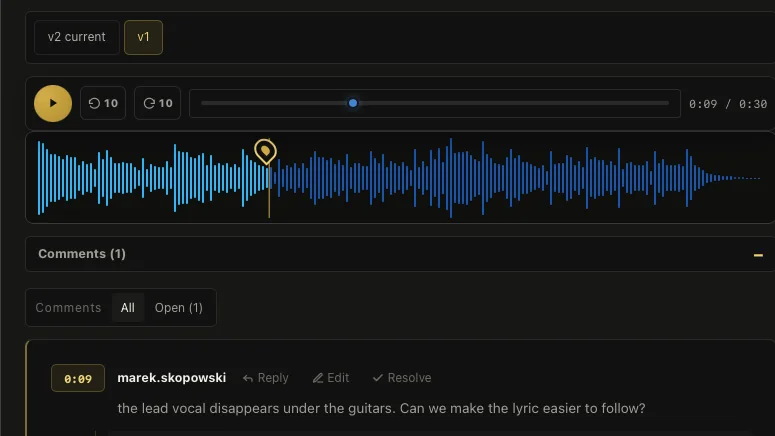
Why final_final keeps happening
The first “final” file is usually the version expected to be approved. Then one lyric needs more level, the outro changes, or a late stakeholder replies. Nobody wants to rename the earlier file, so the next export becomes “final 2,” “final new,” or “final FINAL.”
The filename is trying to store too much: track identity, chronology, status, delivery format, and confidence. As soon as one of those changes, the name stops being reliable.
Use a boring naming convention
For files that must live in a folder, use a predictable structure:
Artist_Track_Mix03_2026-09-06.wav
Keep the track title stable, increase the version number, and use an unambiguous date only when it helps. Put format details such as instrumental, clean, performance, or 24-bit master after the approved version rather than mixing them into the review history.
Avoid words such as “new,” “latest,” and “use this.” They are only meaningful at the moment they are written.
Do not make the filename carry the change log
Names such as “Mix03_vocal-up_less-delay_new-ending.wav” become difficult to scan and still omit important context. Keep the filename short. Store a plain-language revision note with the file or in the review conversation.
The note explains what to verify, while the version number explains order.
Keep one identity for the track
A new export should not start a new conversation. When every revision arrives as an unrelated attachment, comments on the previous version lose their obvious connection to the new audio. The reviewer has to remember which request produced which file.
A revision history solves that problem. One track remains recognizable while its current audio changes. Previous versions stay available for comparison, and the current version is clearly marked without renaming the entire project.
Separate review versions from delivery files
During review, use sequential mix numbers. After explicit approval, create the required delivery files from that approved source: main master, instrumental, clean version, performance track, stems, or other agreed formats.
For example, the approved review item can remain “Mix 04,” while delivery exports become:
- Artist_Track_Master_24bit.wav
- Artist_Track_Instrumental_24bit.wav
- Artist_Track_Performance.wav
This keeps production history separate from the deliverable set and makes it clear which files are intended for release.
Archive instead of deleting the trail
Old versions do not need to clutter the active review, but deleting them removes evidence. Keep an archive long enough to answer normal questions about earlier balances and approved changes. Use the current marker to show what should be heard now.
In Cuepoint Pro, each uploaded revision remains part of the same track history. The visible current version, timestamped comments, and review decisions reduce the amount of meaning that has to be squeezed into a filename.
One track. A visible revision history.
Keep new exports connected to the feedback that created them.
Start free