 Cuepoint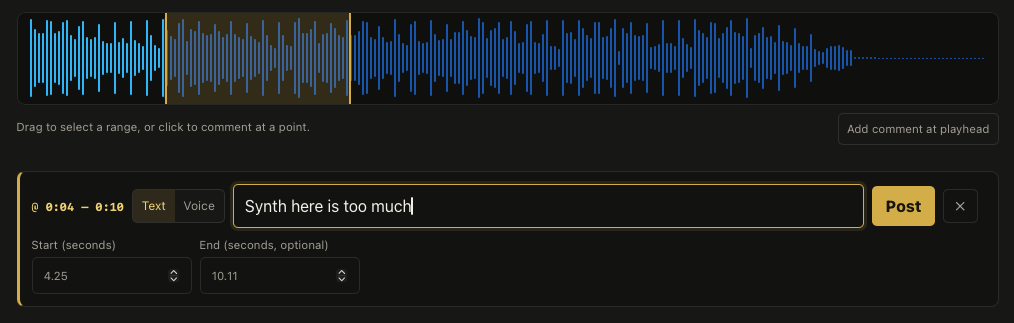
A passage needs a beginning and an end
A timestamp is useful when you want to flag a drum hit, an entrance, or a click. But many notes concern a passage: a synth that crowds the vocal for a few bars, a transition that loses energy, or a section whose balance feels right.
With range comments, you can mark both boundaries on the waveform. The comment shows a start and end time, and selecting it highlights the complete range. The person reading your note can see exactly how much of the audio you mean before deciding what to change.
Select first, write after release
Adding a range comment follows the same listening workflow as a point comment, with one extra gesture:
- Press on the waveform where the passage begins.
- Drag across the passage. The selected area previews while you move.
- Release the mouse button. The comment form opens with both times already set.
- Write your note and select Post.
You can drag in either direction. If a boundary needs adjustment before posting, use the Start and End fields. You can also choose Add comment at playhead and enter both times without dragging. Leave the end empty when your note belongs to a single moment.
In the example above, the highlighted passage runs from about 0:04 to 0:10. The selected times stay fixed while you write, so the note remains attached to the passage you chose.
Keep the discussion attached to the passage
The useful part of a review often happens after the first note. Someone asks what feels crowded, another person explains what they hear, and the producer agrees on a change. Range comments keep that discussion attached to the same stretch of audio.
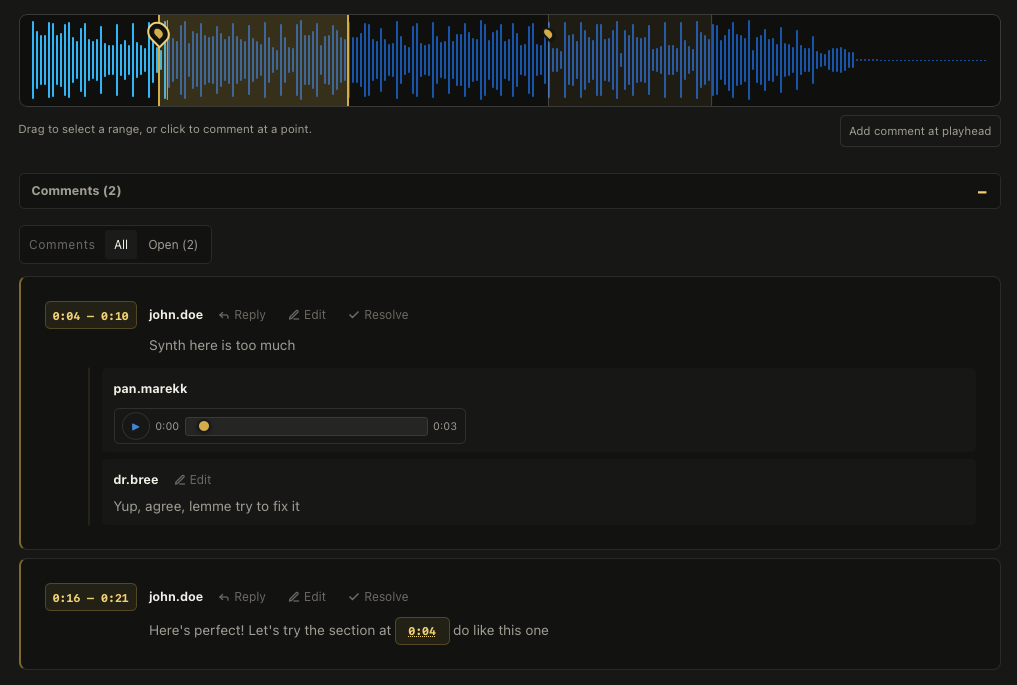
Here, the first range has a voice reply and a text response beneath it. A second comment points to another passage as a useful comparison. Each thread carries its own context, so the conversation can move from “this part feels wrong” to a specific next step.
Click the comment’s time label to return to its start and highlight its full range. Replies stay in the parent thread, and the saved boundaries remain available when you reload the page.
Overlapping notes stay independent
Two people can hear different things in the same passage. One might comment on the vocal balance across a whole section while another flags a shorter synth phrase inside it.
Ranges can overlap, contain one another, or use identical boundaries. They remain separate comment threads. You do not have to find an unused part of the waveform or stretch a note’s meaning just to leave feedback where it belongs.
Make the note actionable
A selected range answers “where?” Your words should explain what you hear and what you want to try. For example: “Through 0:04–0:10, the synth makes the lead vocal harder to follow. Could we try bringing it down slightly and compare?”
Positive feedback benefits from the same precision. Mark a passage whose balance works and explain why, so it becomes a reference for the next revision. Use a point for an exact event and a range for a sustained impression. Both kinds of comment belong in the same review.
Point to the passage you mean.
Bring your audio into Cuepoint and keep the next round of feedback connected to the sound.
Start free